Record your meeting. Get the minutes.
Polifonía is an iPhone app that turns your meetings into text, separates what each person said and gives you the summary, decisions and tasks. All inside your iPhone: no cloud, no accounts, no minute counting.
Free during the beta · on the App Store, one payment and no subscription
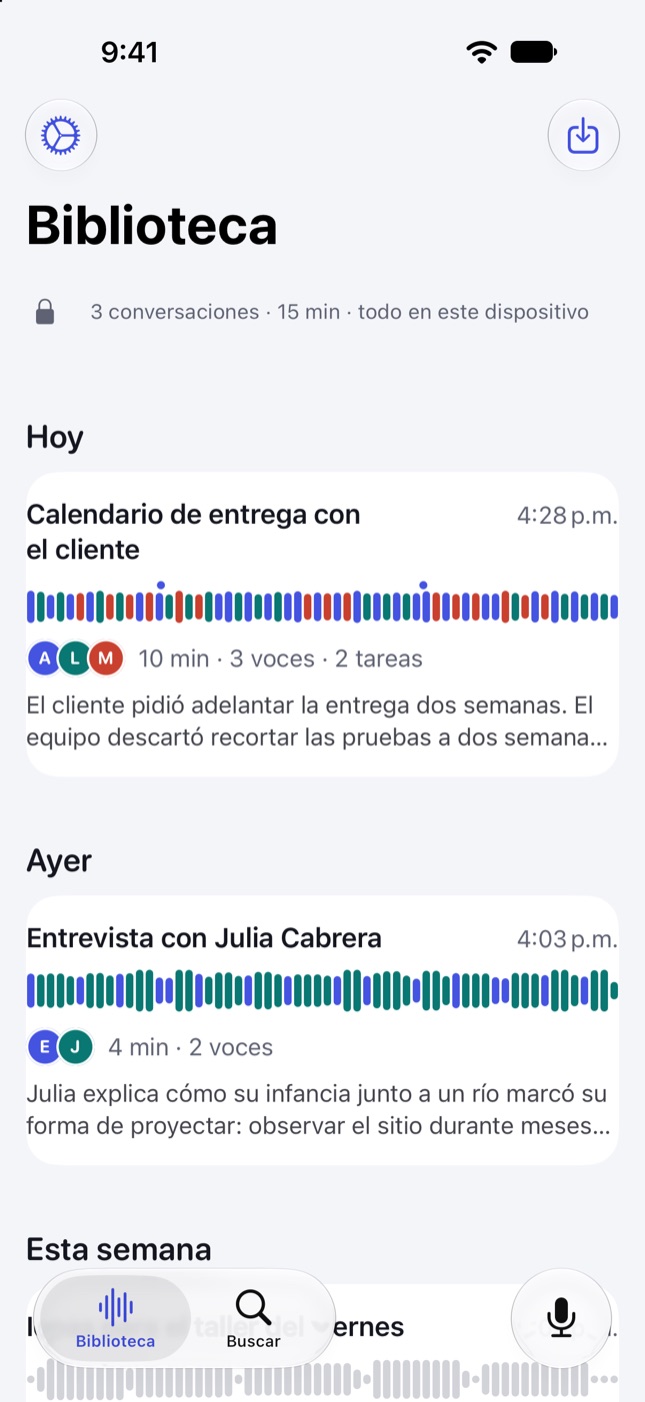
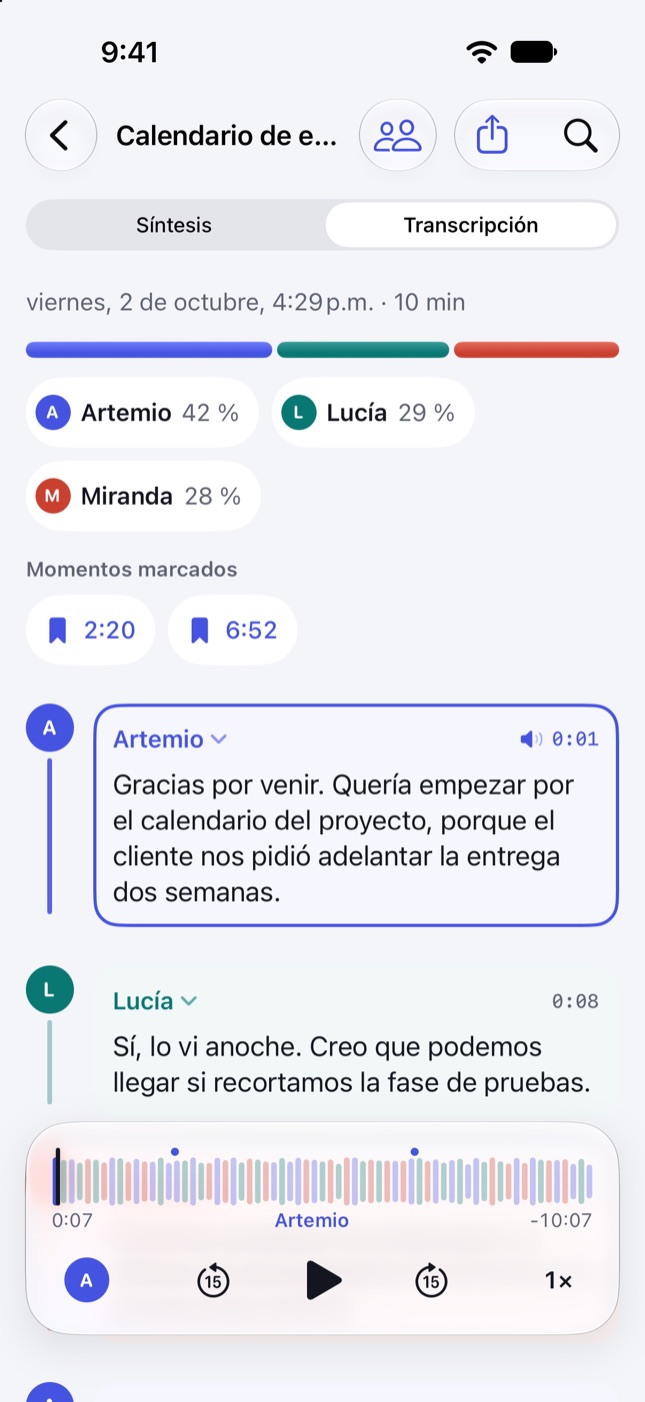
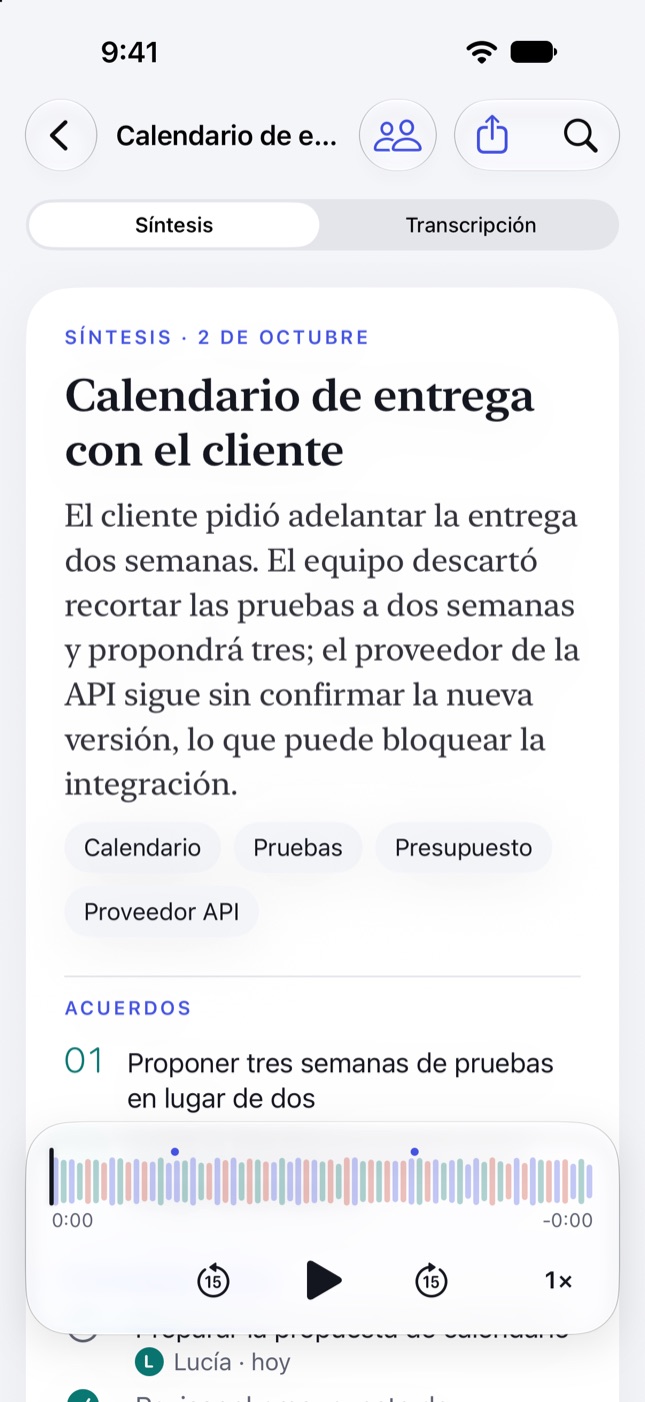
Record. Put the phone down. Read who said what.
- 1
Record or import
One tap to record, or ask Siri. If someone says something important, tap Mark moment and you’ll find it later. It also imports m4a, mp3, wav or mp4.
- 2
Processed on your iPhone
When you stop, the phone transcribes and separates the voices. Every conversation is drawn like a score: one color per person, so you see at a glance who spoke and how much.
- 3
Read the brief and share it
Summary, decisions, next steps with owners and open questions. Send it as text or PDF, or move the tasks to Reminders.
- Ana00:12When did you find out the budget wouldn’t be enough?
- Luis00:18In March. We said it in the meeting, but it didn’t make the minutes.
- Speaker 300:31I was there. There are emails from that week.
Illustrative example.
For conversations that can’t leave the room.
Teams
Meetings with several people: when it ends, the minutes with decisions and tasks are already done.
Next steps straight to Reminders.
Journalists
Interviews with several voices. Your sources’ recordings stay on your phone.
Mark the quote while you record.
Lawyers
Client meetings where it matters who said what. Confidential matters never go through third-party servers.
Export the transcript for the case file.
Researchers
Qualitative interviews and focus groups. Rename participants with codes (P1, P2…) before exporting.
Export Markdown for your analysis.
From audio to minutes, without writing a line.
Brief
Summary, decisions, next steps with owner and deadline, and open questions. Generated by Apple Intelligence on the device itself.
Ask the conversation
“Who committed to what?”, “What dates were mentioned?”. Answers drawn from the transcript.
Siri and Control Center
“Record a meeting with Polifonía”, pause and stop without opening the app. While recording, the timer shows on the Lock Screen.
Marked moments
One tap while recording and that instant is flagged in the transcript, ready to hear again.
Player by person
Tap any sentence and the audio jumps there. While playing, the text follows whoever is speaking.
Share
Brief as text or PDF; transcript as TXT, Markdown or SRT subtitles; tasks to Reminders.
The others take your audio and charge you by the minute. Polifonía protects your privacy.
Most transcription apps upload every recording to their servers and cap how much you can record. AI recorders also make you buy a gadget. Polifonía does all the work on the iPhone you already carry.
| Cloud apps | AI recorders | Polifonía | |
|---|---|---|---|
| Where your audio is processed | On their servers | On their servers | On your iPhone |
| Recording limit | 300 min a month on free plans, capped per conversation | 300 min a month; more with a subscription | No minute counter |
| Account required | Yes | Yes | No |
| Extra hardware | No | Yes, a separate gadget | No, your iPhone |
| Works in airplane mode | No | Records, but doesn’t transcribe | Yes, everything |
| In-person meetings | Many only record video calls | Yes | Yes, with the phone on the table |
| How you pay | Free with limits; then a subscription | The gadget, plus a subscription for more minutes | One payment, no subscription |
Based on plans published by popular cloud transcription apps and AI recorders, October 2026. Polifonía is free during the beta.
Your recording doesn’t travel.
An interview with a source, a client meeting or a research session shouldn’t go through anyone’s server. With Polifonía, they don’t.
- Microphone
- Your iPhoneTranscript, voices and brief
- Your library
Internet connection, just once: Polifonía downloads a model to tell voices apart (about 25 MB) and the system sets up the recognition language. After that it works in airplane mode. Your audio and texts are never part of those downloads.
- No accounts
- No cloud
- No analytics
- No ads
Voice separation is automatic. And it’s fixed with a tap.
Works best
With the phone in the middle of the table, little background noise and one person talking at a time. If you tell it how many people there are before recording, it gets it right more often.
Can make mistakes
When two voices sound very alike, when people talk over each other, or in places with echo or music. No automatic transcription is perfect: check before you quote.
Fixing it is easy
Tap a block’s name to say who said it, merge two “speakers” who were the same person, or separate again saying how many people there were.
What you need to know before recording.
- Languages
- Spanish and English, plus other languages such as Portuguese, French, Italian and German.
- People
- Designed for conversations of up to 8 people. It detects them on its own, or you can tell it how many there are.
- Brief
- Requires a device that supports Apple Intelligence. Transcription works on any iPhone with iOS 26.1 or later.
- Connection
- Works offline after an initial download.
- Import
- m4a, mp3, wav and mp4, from Files or the Share menu.
- Devices
- iPhone with iOS 26.1 or later. Mac version for Apple silicon on the way.
Try it before anyone else. In three steps.
- 1
Install TestFlight
It’s Apple’s free app for testing apps before they reach the App Store. Get TestFlight
- 2
Join with the link
On your iPhone, open the beta link and tap “Accept” in TestFlight.
- 3
Install and tell us
Tap “Install”. To send us feedback, take a screenshot inside Polifonía or go to TestFlight › Polifonía › “Send Beta Feedback”.
You need an iPhone with iOS 26.1 or later. The brief requires a device that supports Apple Intelligence. The beta is free and each test build lasts 90 days. If TestFlight says the beta isn’t accepting testers, try again in a few hours: it may be in review or full.
Your next meeting already has someone to write it up.
Record your next meeting and walk out with the minutes done, without the audio ever leaving your device.